


XTOOL M822 Adapter For Toyota 8A / For Mercedes Benz All Keys Lost
Work with X100PAD3 / X100 MAX/ IK618 / IP616/ IP819 / IP819TP

Reliable, Safe and Secure shopping with us.

Country-wide Courier / Post available

Returns are welcome. T&Cs apply.
M822+J1K02 Benz Cable = M822 + M821
M822+J1K02 Benz Cable For Mercedes-Benz All Keys Lost Communication Adapter is used for finishing and optimizing all key lost programming for multiple Mercedes-Benz modules.
With M822+J1K02 Benz Cable, you can save as much as 65% of the calculation time on the process, or save you from plugging the key emulator in and out for hundreds of times.
Note: M822 Adapter needs to be used with advanced XTOOL Key Programming Devices eg: X100 Pad3/X100 Max and KC501 Key Programmer.
nstructions on Toyota 8A Blade keys All-keys-lost Programming
M822 Includes M821 Features
Tools You Need:
XTOOL Tablet (Take X100PAD Elite as example)
Main Cable & OBD2-16 Connector
M822 Communication Adapter
Toyota 8A Specialized Wiring Harness
KC100 Key Programmer
KS-1 Toyota Key Emulator
Network Connection
Models Supported:
2014~2019
For Toyota Levin
For Corolla
For RAV4
For Prado
For Land Cruiser
For Camry
For Highlander
For Reiz
For Sienna
For Hiace
For Hilux
For Crown Kluger
For Aygo with IMMO box F3-F4-K6-S6
Note: This is not compatible with American models with "H" Chip blade keys. For these models, please use the Reset IMMO function that is supported on X100PAD2/X100PAD3/X100PAD3 SE/X100MAX/IK618/D8/D8 BT/IP616/IP819/IP819TP/A80/A80 PRO/A80 PRO MASTER/PS90/D9/D9 PRO.
Connection Method
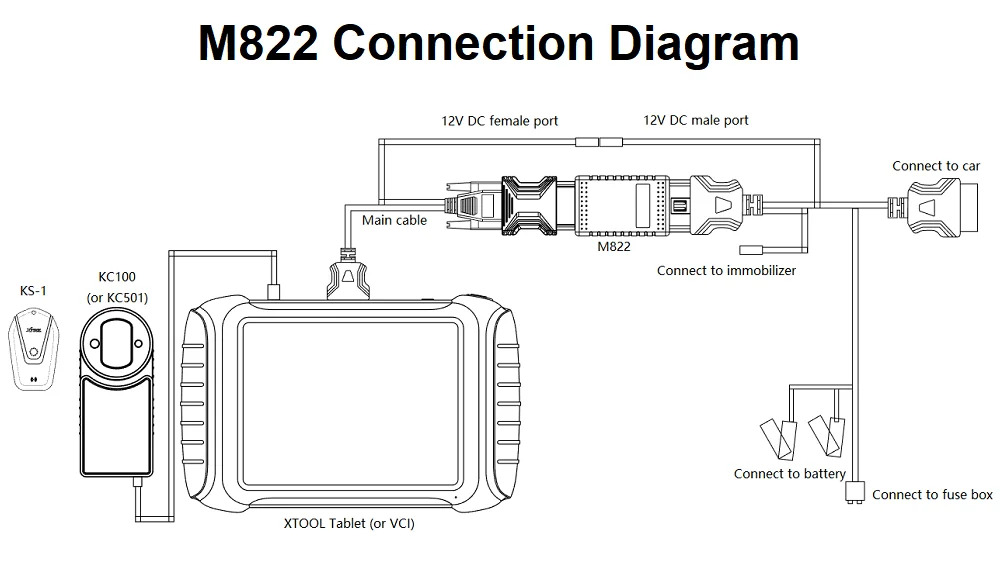
Connect VIA OBD:
1. Connect KC100/KC501 to the device via USB and prepare a KS-1
2. Connect the device (or VCI box) with the M822 Adapter using the main cable.
3. Connect the Toyota cable to the car using OBD port.
4. Take the battery clip from the car out and use the battery clip to connect the cable to the battery.
5. Take out the fuse from the fuse box then plug the cable into it.
6. Find the 12V DC male port from the Toyota cable and connect it to the 12V DC female port from the main cable.
Note:
For different models, the connection method might not be same. Sometimes an extend cable is needed, and the fuse might be different. Please check XTOOL tablets for detailed wiring diagram when connecting to vehicle and fusebox.
Connect on bench:
1. Connect KC100/KC501 to the device via USB and prepare a KS-1
2. Connect the immobilizer to the Toyota bench cable.
3. Connect the main cable and the Toyota bench cable via M822 adapter.
4. Connect the 12V DC adapter to the main cable.






XTOOL M822 Adapter For Toyota 8A / For Mercedes Benz All Keys Lost
Work with X100PAD3 / X100 MAX/ IK618 / IP616/ IP819 / IP819TP


